

I have a problem to be solved, and AI will be a part of the solution
(as opposed to the approach where there is a struggle to find a problem that can be solved by AI).
DIY AI expense tracker: when banks fall short
Kamil Jeziorny
15 min read

DIY AI expense tracker: When banks fall short
Tired of messy bank statements? Learn how to build your own smart expense categorizer using OpenAI Function Calls and Python. Complete with real-world testing and code you can actually use. In this guide, we’ll walk through how AI can categorize your expenses automatically – no manual entry, no spreadsheet chaos – with code examples you can actually use.
DIY financial intelligence: creating an AI-powered expense tracker
When I was a college student, I had a lecture called formal languages and translation techniques. During one of our classes, the lecturer introduced a parser generator (part of a compiler) called YACC. YACC stands for Yet Another Compiler-Compiler, and I think its name gives good insight into the attitude toward creating parser generators at that time.
Today, I feel like Stephen C. Johnson, because I want to introduce you to yet another AI solution (YAAS). While using AI in projects isn't innovative nowadays, there are a couple of things that will be at least valid in terms of approach:
After banging my head against traditional solutions, AI turned out to be the only way to crack this particular nut.
*I'm not blaming this approach. AI is really catching everyone's attention right now, and customers are eager to include it in their projects. This excitement often encourages architects and programmers to experiment with AI solutions that aren't their usual approach. Even if it doesn't always follow traditional engineering paths, it's a great opportunity to get creative.
The bank won't help? Fine, let's build our own AI solution
Most banking apps promise insights but rarely deliver anything meaningful beyond pie charts.I always wanted to have statistics about my spending and I feel like it's a bit of a cringe that my bank isn't providing me with it. Banking apps: please feel challenged. Many financial experts and investment specialists have repeatedly emphasized the importance of tracking your spending to achieve financial freedom. They recommend tracking every expense, and it's reasonable, albeit quite boring. Unless you’re using cash, your bank statements already hold the answers. You just need a system smart enough to understand them.
Why do traditional expense tracking apps just don't cut it
Most apps focus on user experience – fancy dashboards, colorful graphs – but still require manual data entry. Even the ones that scan receipts need you to do something every time you buy a coffee. That might work for cash spending, but not for people whose transactions are mostly digital. So, why not let AI handle this entirely?
From CSV to AI: transforming raw bank data into smart categories
My case is different: the majority of my expenses are paid with a card, and I'm mostly a customer of one (old-fashioned) bank. In such conditions, there is no better institution for expense tracking than the bank I'm a customer of. Fortunately, every bank I know provides a feature of downloading statements containing all the expenses you made. In my case, the statement is in the form of a CSV file, which simplifies things a bit.
Here is a snippet from my bank account statement:
05-01-2024,04-01-2024,43.26 PLN WESOLA PANI WROCLAW,,,"-43,26",,95,
03-01-2024,03-01-2024,Prowizja za przewalutowanie transakcji,,,"-0,07",,100,
03-01-2024,03-01-2024,0.62 USD 0.62 USD 1 USD=4.1255 PLN AWS EMEA aws.amazon.co,,,"-2,56",,101,
03-01-2024,02-01-2024,15.86 PLN LIDL SWOJCZYCKA Wroclaw,,,"-15,86",,102,
01-01-2024,01-01-2024,29.99 PLN HBO MAX Prague,,,"-29,99",,109,
01-01-2024,01-01-2024,53.95 PLN BOLT.EU/O/2401010007 Warsaw,,,"-53,95",,110,
The biggest value I get from tracking my expenses is knowing what portion specific spending categories make up all my expenses. How much did I pay for groceries this month? How much money did I spend on dining out? Those questions can only be answered when an expense falls into some specific category. Such labeling can be done by AI, and this article is mostly about it.
String matching vs AI: why we need the big guns
Sure, you could write a few if "LIDL" in expense: statements, but that’s not scalable.
Every time a new merchant or keyword appears, you’d need to update your code.
for expense in csv_rows:
    if "HBO" in expense:
        classification['subscriptions'].append(expense)
    if "LIDL" in expense:
        classification['groceries'].append(expense)
    ...
That’s not automation – that’s maintenance. Instead, I wanted AI to infer the category from the transaction context without me lifting a finger.
Want to go deeper into automation? Explore our guide on How to implement DevOps automation in your business.
The quest for the perfect AI solution: from AWS to ChatGPT
Choosing the right toolkit is one thing, but making AI responses predictable is another. Prompt engineering alone wasn’t enough – ChatGPT kept changing response formats, breaking my parser each time. I started getting mad and decided to ask it:
How can I force you to use the same structure every time? Can you choose one way of answering me and keep it so that I can use you? Is it really that hard for you to cooperate with me???
And it said:
Kamil, please, ease into chill, Function Calls API's there, your app's thrill.
Indeed, it appears that OpenAI has developed a workaround for that, providing us with a function calls API to help us make better software.
How does the function calls API work?
It's a black box that needs context and function(s) specification on input and returns a suggestion of how the function you specified can be called using information taken from the context. This might feel complicated, so let's work with an example.
def display_expense(
    amount_of_money: int, title: str, category: str,
) -> None:
    print(f"{amount_of_money} - {title} - {category}")
In the specification, we are required to put the function name, its description, and the arguments it takes. Here is an example specification of display_expense:
display_expense_specification = {
    'name': "display_expense",
    'description': 'Displays title, outcome and category of expense',
    'parameters': {
        'type': "object",
        'properties': {
            'amount_of_money': {
                'type': 'float',
                'description': 'money spent',
            },
            'title': {
                'type': 'string',
                'description': 'title of an expense',
            },
            'category': {
                'type': 'string',
                'description': 'category of an expense taken from title'
            },
        },
        'required': ['amount_of_money', 'title', 'category']
    }
}
To work with the OpenAI API, you need to have the OpenAI client library. This can be easily installed with pip.
Putting it all together:
context = '20.00 PLN;MOON KEBAB'
display_expense_specification = {
    'name': "display_expense",
    'description': 'Displays title, outcome and category of expense',
    'parameters': {
        'type': "object",
        'properties': {
            'amount_of_money': {
                'type': 'float',
                'description': 'money spent',
            },
            'title': {
                'type': 'string',
                'description': 'title of an expense',
            },
            'category': {
                'type': 'string',
                'description': 'category of an expense taken from title'
            },
        },
        'required': ['amount_of_money', 'title', 'category']
    }
}
client = OpenAI(api_key='api-key')  # replace 'your-api-key' with your actual API key
openai_response = client.chat.completions.create(
    model = 'gpt-3.5-turbo',
    messages = [{'role': 'user', 'content': context}],
    functions=[display_expense_specification]
)
Here is the openai_response:
ChatCompletion(
    id="chatcmpl-8wqBOaKKZ44nyeuvY3MOYf7qXHEPa",
    choices=[
        Choice(
            finish_reason="function_call",
            index=0,
            logprobs=None,
            message=ChatCompletionMessage(
                content=None,
                role="assistant",
                function_call=FunctionCall(
                    arguments='{"amount_of_money":20,"title":"MOON KEBAB","category":"FOOD"}',
                    name="display_expense",
                ),
                tool_calls=None,
            ),
        )
    ],
    created=1709034306,
    model="gpt-3.5-turbo-0125",
    object="chat.completion",
    system_fingerprint="fp_86156a94a0",
    usage=CompletionUsage(completion_tokens=36, prompt_tokens=95, total_tokens=131),
)
ChatGPT suggested that I should call display_expense with the following arguments:
{
  "amount_of_money": 20,
  "title": "MOON KEBAB",
  "category": "FOOD"
}
The moment of truth: testing our AI financial assistant
I wanted to have an answer to the question: Can ChatGPT handle expense classification for me?
So, I built a dataset of 450 manually labeled transactions across categories like groceries, gas, dining out, healthcare, and entertainment. Then, I compared AI-generated classifications with my own.
>>> from collections import Counter
>>> Counter(expense_title_to_expense_category_data.values())
Counter({
    'groceries': 30, 'dining out': 30, 'shopping': 30,
    'gasoline': 30, 'online shopping': 30, 'others': 30,
    'entertainment': 30, 'healthcare': 30, 'transportation': 30,
    'personal transfer': 30, 'car': 30, 'donations': 30,
    'pharmacy': 28, 'sport': 23, 'atm withdrawal': 21,
})
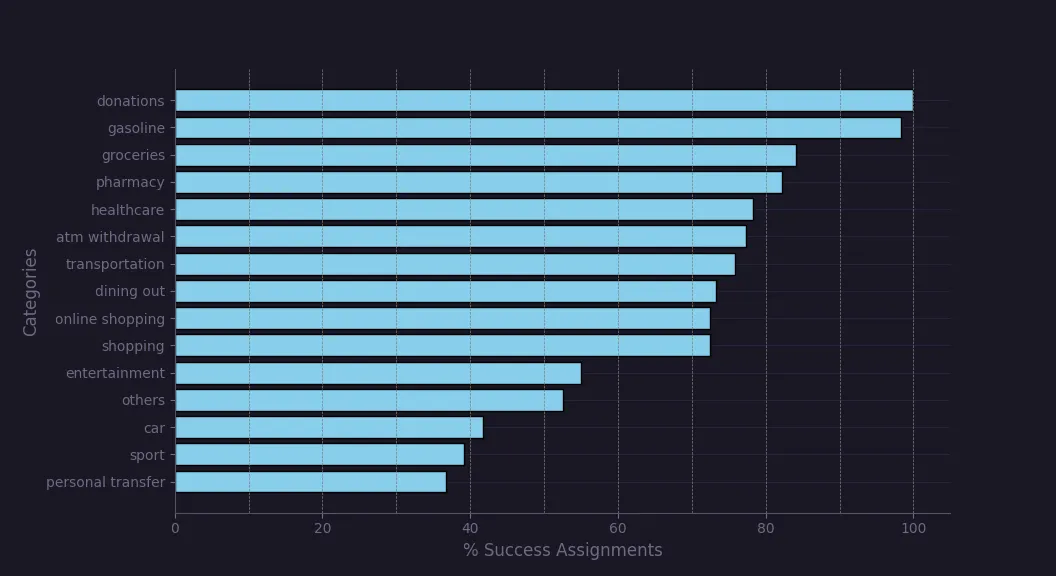
Classification was considered successful when ChatGPT labeled a given expense with the same category as me. Expense classification was considered mismatched if it was present in the OpenAI API response and it was assigned a different category than I did.
Here is the code for that:
def get_category_to_classification_success_ratio(human_classified_data, gpt_classified_data):
    category_to_number_of_matches = defaultdict(int)
    for title, category in human_classified_data.items():
        is_expense_present_in_gpt_response = title in gpt_classified_data
        is_gpt_classification_correct = gpt_classified_data.get(title) == category
        if is_expense_present_in_gpt_response and is_gpt_classification_correct:
            category_to_number_of_matches[category] += 1
    number_of_expenses_assigned_per_category = Counter(list(human_classified_data.values()))
    return {
        category: round(
            100
            * category_to_number_of_matches[category]
            / number_of_expenses_assigned_per_category[category],
            2
        ) for category in _TESTED_CATEGORIES
    }
Additionally, I specified categories that Chat GPT could use as enum values. I ran classification for the 450 expenses four times and took the average success ratio from them. Here is the % of successful assignments for every category:
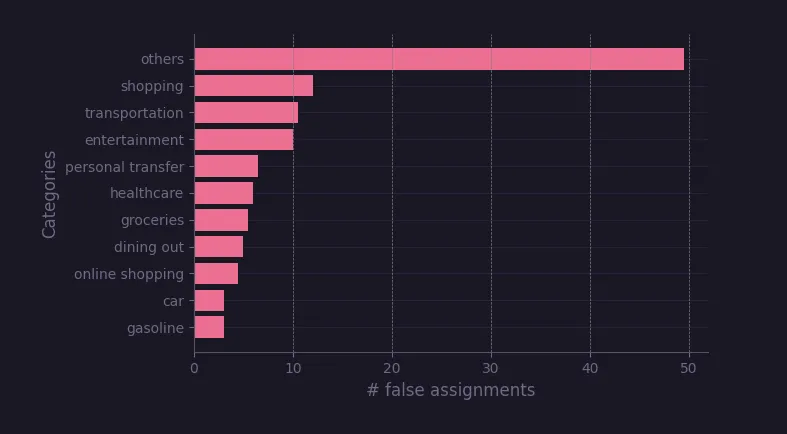
I also checked the number of false assignments for every category. I wanted to see which categories were used when ChatGPT had no better idea. I run this test two times and took average from them. Here are the results:
What we learned: AI's hits and misses in expense classification
At first glance, one might think ChatGPT is good for classifying transactions like donations, gasoline, and groceries, and so did I. However, I later realised it's less about the categories themselves and more about my personal definitions of them. LLMs are trained on the opinions of many, many people. With different views on what food, shopping, and groceries are, the model adopts a general definition of them to satisfy the majority. If you consider your perspective unique (probably it's not), ChatGPT might not fully meet your expectations.
There is space for improvement, though, as OpenAI allows for model fine-tuning. If you have enough data, you can train it for better accuracy on your terms for categories like food, sports, or entertainment. The open question is how much data is enough for you to fine-tune a model to get the same definition of things as you.
Ready to build your own AI-powered solution?
This expense tracker is just one example of how AI can transform everyday business challenges into opportunities. Whether you're looking to automate processes, enhance user experience, or build custom AI solutions, our team of developers can help turn your vision into reality.
Want to explore how AI could revolutionize your business operations? Check out our Web Development services and let's discuss how we can build something amazing together. Got a unique challenge? We love those! Let's start a conversation about your next game-changing solution.
FAQ
What is an AI expense tracker?
An AI expense tracker uses artificial intelligence to categorize your spending automatically. It processes transaction data — like bank statements or CSV files — and assigns categories such as groceries, bills, or subscriptions without manual tagging.
How do OpenAI Function Calls improve expense tracking?
Function Calls enforce structured output from ChatGPT, making it easier for developers to process and integrate AI responses into real applications without worrying about inconsistent formats.
Can I build an expense tracker using Python?
Yes. With just a few lines of Python code and the OpenAI API, you can build a system that reads your transactions, interprets them using GPT, and organizes them into meaningful spending categories.
Is AI accurate enough for financial categorization?
Out of the box, it’s impressively accurate for general categories. For niche or personalized expense patterns, you can fine-tune the model with your own labeled data to improve accuracy.

Kamil Jeziorny
Backend Developer
Kamil likes to call himself a "vibe coder", which might explain some wild project adventures last month. Now, he's making amends with some killer articles, promising they're all his creations (or are they?). Either way, he's all about keeping things positive and leveling up.

Sebastian Spiegel
Backend Development Director
Inspired by our insights? Let's connect!
You've read what we can do. Now let's turn our expertise into your project's success!